Apps · Windows · macOS · Open source
Draxbyte — free up disk space without risking anything
Is your disk full? Draxbyte finds large and useless files (old logs, caches, node_modules, build output, disk images), duplicate files and Docker leftovers locally, colours them safe / careful / keep, and never deletes anything until you approve. Deleted items go to the Recycle Bin; if something was wrong, you undo it. For Windows and macOS.
- Free
- MIT licensed
- Open source
- Windows + macOS
- ~20 MB
- English + Türkçe
- No telemetry
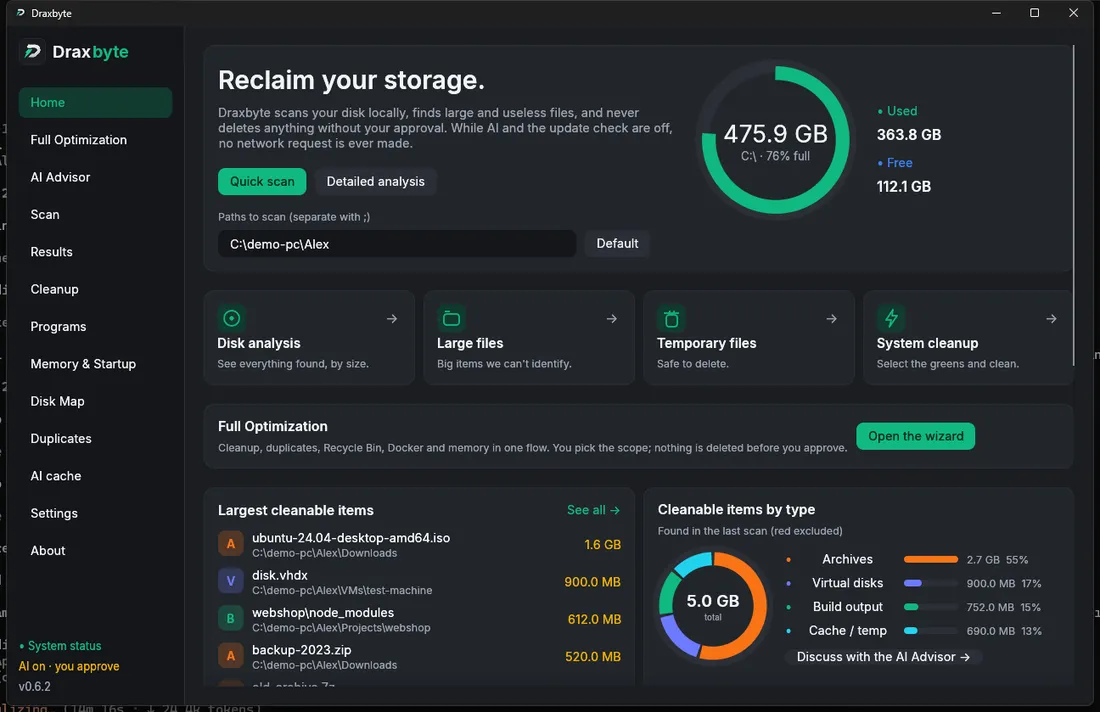

Why Draxbyte?
Never deletes without your approval
Scanning only reads. Every delete goes through a confirmation screen that shows the total; red items cannot even be selected.
Works entirely on your machine
Scanning and decisions happen locally. No account, no telemetry, the update check is off by default; while AI is off not a single network request is made.
Reversible
The Recycle Bin is the default. Use a dry run to see what would happen first, and undo with one click after cleaning.
Knows what is disposable
It recognises node_modules, Gradle / Cargo build output, old archives, disk images and virtual disks, and tells you the reason on every row.
More than cleaning
Draxbyte does not only find disposable files; it also has tools that help you understand and keep your disk in order.
Disk Map
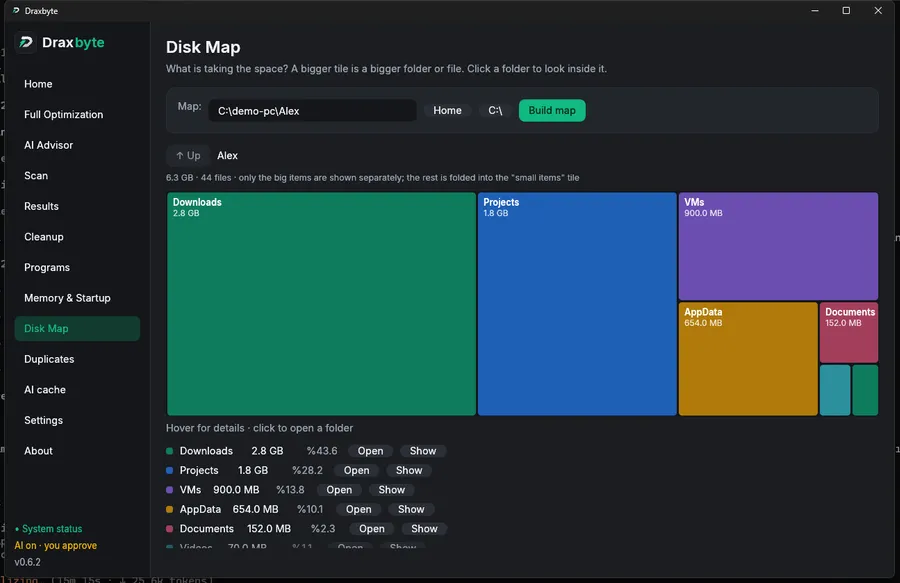
What is taking the space? See it as coloured tiles sized by use (a treemap) and click a folder to look inside. Read-only.
Duplicate Files
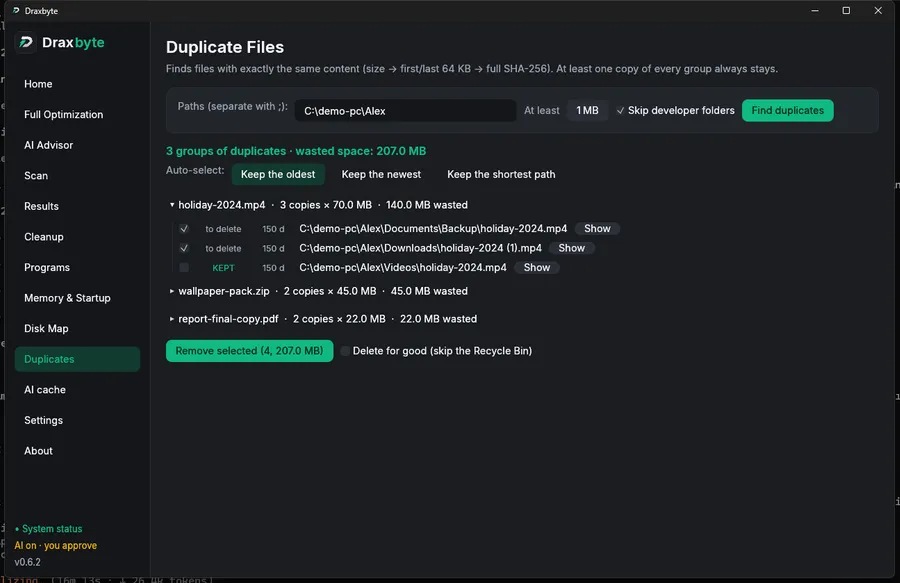
Finds files with exactly the same content (size → first/last 64 KB → full SHA-256). At least one copy of every group always stays; deletions go to the Recycle Bin.
Full Optimization
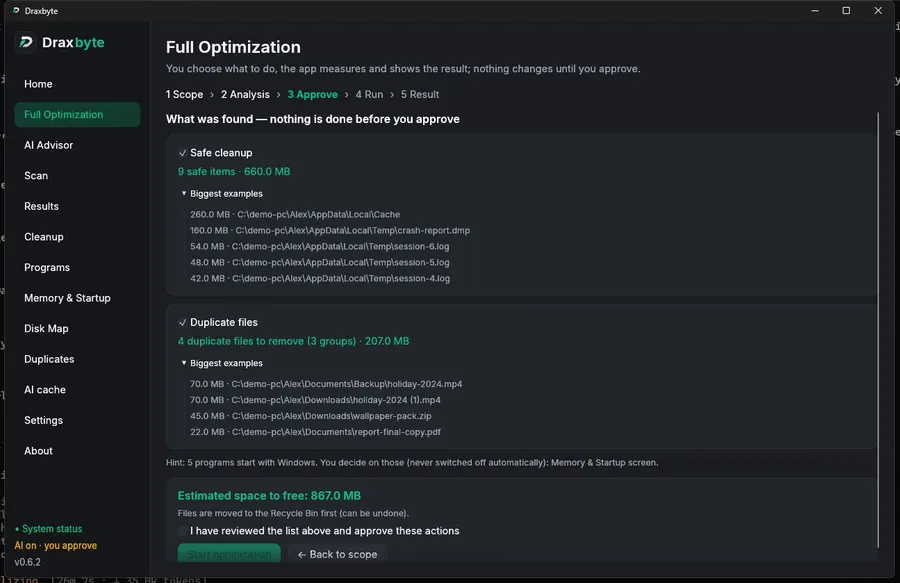
Cleanup, duplicates, Docker (part by part), Recycle Bin and memory in one flow: pick the scope, review a read-only analysis, approve. Nothing changes before the approval. It can also shrink the Docker disk image (Windows, administrator rights, off by default; it restarts the containers that were running, in the old order).
Programs
Lists installed programs with size and last use; removes them completely with the vendor's uninstaller plus leftovers (AppData, registry, services, tasks). The registry is exported first and can be restored. On macOS: .app bundles and their ~/Library files.
Memory & Startup
See what uses memory, close what you pick (there is a protected list), switch startup programs off and on without deleting them. "Free memory" says honestly that its effect is temporary.
AI Advisor
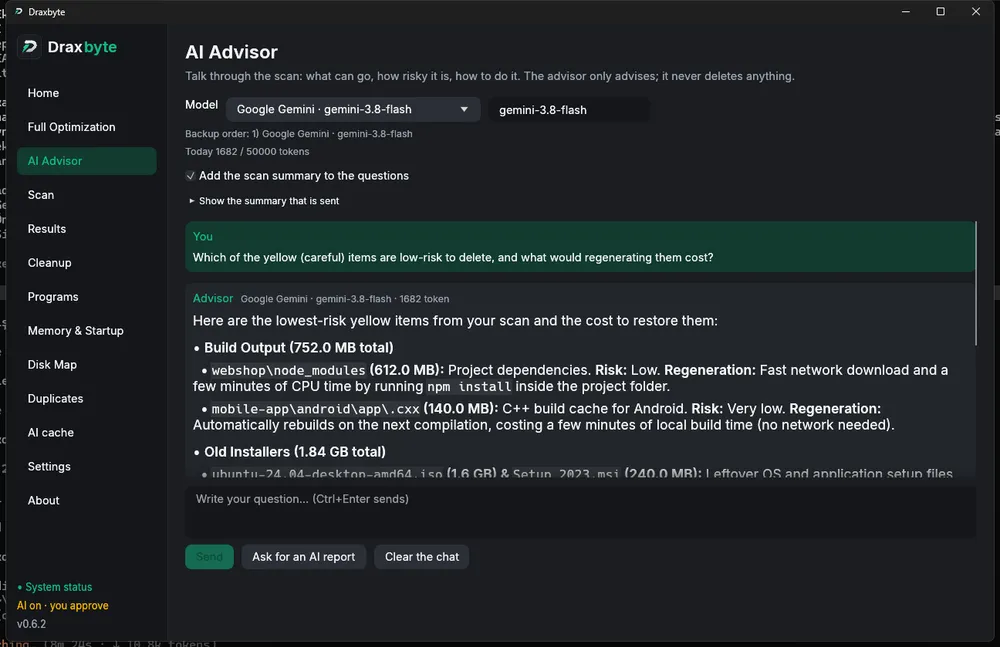
A chat about the last scan and a one-click AI report. It only advises and never deletes. Order several providers as a failover chain; if one fails the next one answers and the reason is shown.
How it works
1 · Scan
Your folders are walked in parallel. Folders like node_modules are counted as one row with their total size, so thousands of files do not flood the list.
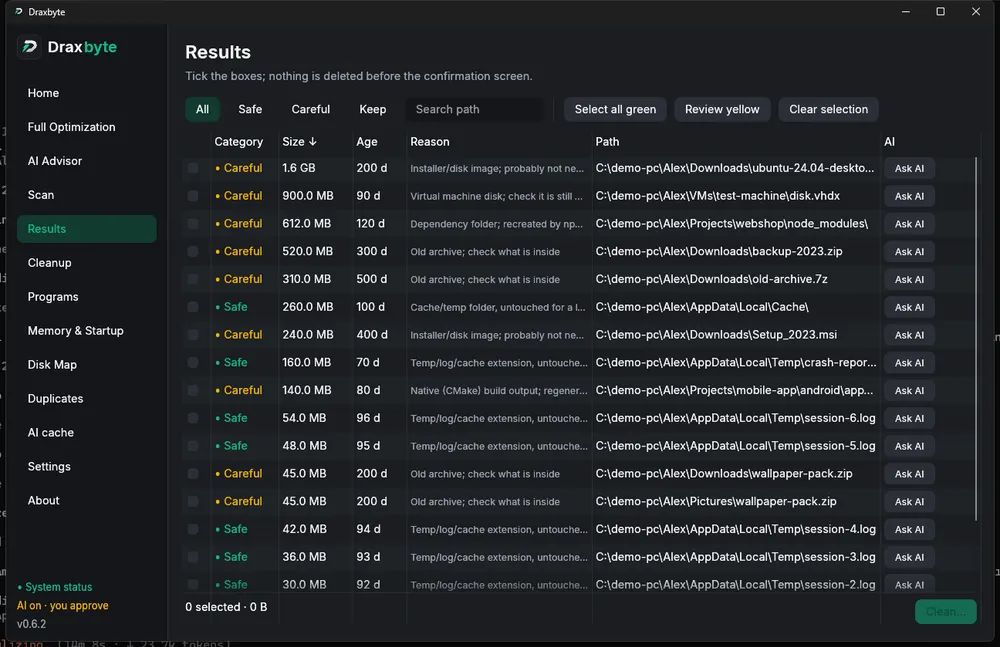
2 · Review and confirm
Select all green with one click and judge the yellow ones yourself. The confirmation shows the total; a dry run reports without touching anything.
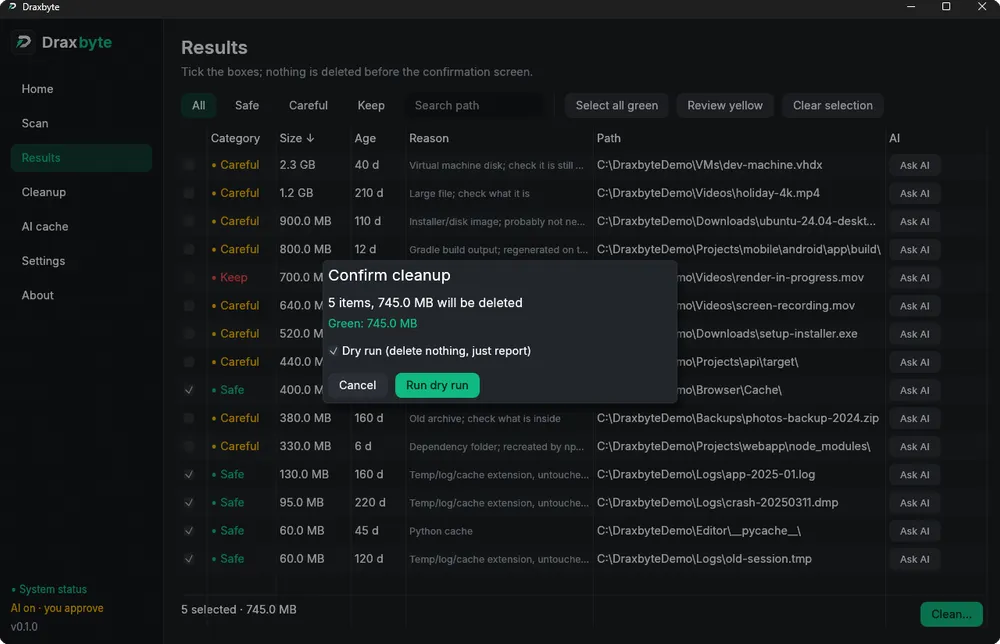
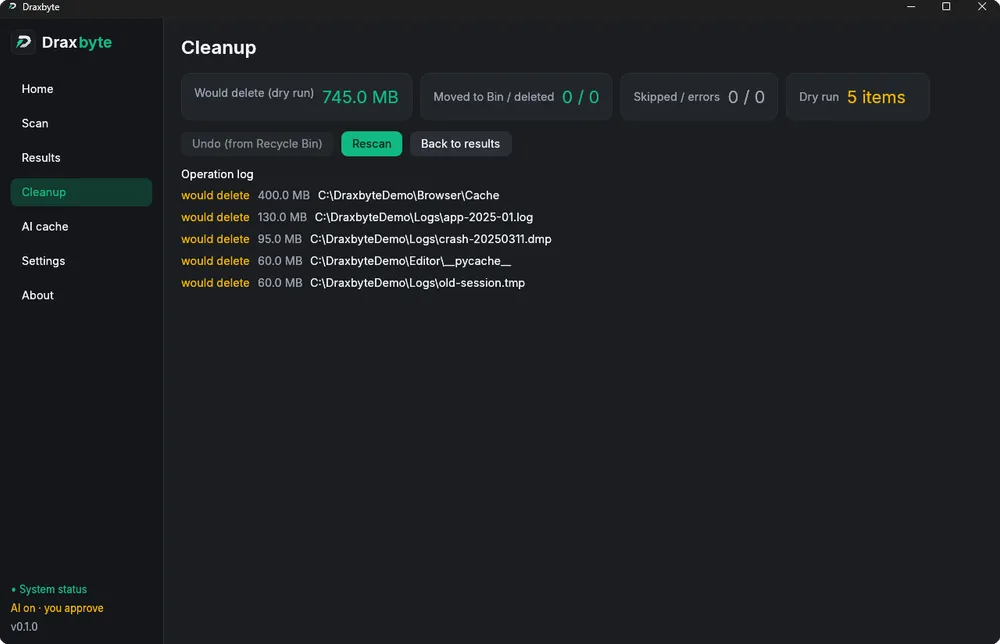
3 · Clean, and undo if needed
Items are moved to the Recycle Bin. The report lists what happened to each one, and Undo puts them back where they were.
What can it free up?
The rule engine needs no AI; it recognises the following and writes the reason for each:
- Log, dump, temp and backup files untouched for a long time (.log, .tmp, .dmp, .bak…)
- Cache folders and Python caches (__pycache__)
- Regenerable build output such as node_modules, Rust target, Gradle build and .cxx
- Installer and disk images (.iso, .dmg, .msi…) and old archives (.zip, .7z, .rar…)
- Virtual machine disks (.vhdx, .vmdk, .vdi…) and very large files it cannot identify
- Every internal drive and the system folders (Windows\Temp, Package Cache, Windows.old…) plus the Recycle Bin; Docker build cache, unused images and networks
Three colours, clear meaning
- SafeDeleting breaks nothing: old temp files and caches.
- CarefulDeletable, but take a look: regenerable build output or large files it cannot identify.
- KeepCannot be selected or deleted: system and application files, big files changed in the last 24 hours.
Safety comes first
The most important job of a disk cleaner is not deleting the wrong thing. Draxbyte uses two layers of protection:
- The Windows folder, Program Files, ~/.ssh, ~/.gnupg, ~/.aws, filesystem roots and your home folder itself are never deleted
- Symbolic links and junctions are neither followed nor deleted
- Red items cannot be selected in the UI and the code refuses them as well
Every item is re-checked right before it is deleted
- Does it still exist, and is it not a symbolic link?
- Is another program holding it open? (a lock test on Windows)
- Did it change since the scan? (size and modified time; for folders, is there a newer file inside)
- If any check fails the item is skipped and the report says why — that is protection, not a bug.
Optional AI and AI Advisor — off by default
If the rule engine cannot identify something you can ask an AI, or discuss the last scan with the AI Advisor. It is entirely optional; while it is off nothing leaves your computer.
- AI Advisor: a chat plus a one-click report. It only advises; it deletes nothing and never suggests deleting protected items
- Failover chain: order as many providers as you like. Every request starts with the primary and moves to the next on a network error, timeout, rate limit (429), bad key (401), server error (5xx) or unreadable answer, and the answer shows who failed and why
- Key isolation: in a chain each provider gets only its own key (DRAXBYTE_API_KEY_<PROVIDER>); one provider's key never reaches a fallback
- 14 providers: Ollama and LM Studio (on your computer, free, no key), Gemini, Groq, OpenRouter, NVIDIA, Mistral, Anthropic, OpenAI, Kimi, xAI, EVREN, Alibaba and any OpenAI-compatible URL
- Fetches the model list from the provider automatically; no need to type model names
- First use asks for consent and previews the summary to be sent; sizes, rule names and shortened paths go out (home folder shown as ~), never file contents. The chat lives in memory only
- Answers are cached locally so the same question is never sent twice, and there is a daily token limit
Command line
It also runs without the GUI, for scripts and servers. The clean, dupes and optimize commands are a dry run by default.
draxbyte scan C:\Users\Me\Downloads --limit 20     # list (changes nothing)
draxbyte clean C:\Temp                              # DRY RUN (default)
draxbyte clean C:\Temp --apply                      # move green items to the Recycle Bin
draxbyte clean C:\Temp --yellow --apply             # include yellow items
draxbyte dupes C:\Users\Me --min-size-mb 50           # duplicate files (dry run)
draxbyte map C:\Users\Me --depth 2                    # disk map (text)
draxbyte optimize                                    # full optimization analysis (--apply runs it)
System requirements
- Windows (developed and tested on Windows 11) or macOS (Intel + Apple Silicon)
- Windows: a step-by-step install wizard (Draxbyte-Setup.exe, no administrator rights needed to install) or a portable exe with no install; about 20 MB
- On Windows it asks for administrator rights at start so no folder is out of reach (decline and it still opens; Settings turns it off)
- macOS: opened from the .dmg it installs into Applications. It is not signed or notarized by Apple: right-click → Open on first launch. The GUI has not yet been tried by hand on a real Mac; tests and a smoke test run on GitHub's macOS runner
- The code is platform-aware for Linux but has not been built or tried there
Download
The buttons always point to the latest release · MIT licence
Frequently asked questions
Is Draxbyte free?
Yes. Draxbyte is open source and distributed free under the MIT licence. There are no ads, accounts or subscriptions.
Is Draxbyte safe? Could it delete an important file by mistake?
System folders, secrets and big files changed in the last 24 hours are never deleted. Every delete needs your approval and each item is re-checked right before deletion (does it still exist, is it locked, did it change since the scan). By default items go to the Recycle Bin and can be restored.
Does it collect or send my data anywhere?
No. There is no telemetry or account; the update check is off by default. AI is off by default; if you turn it on, only the buttons you press (fetch models, test connection, send) make a request, and you see the summary before it is sent. File contents never leave your PC.
I deleted something by mistake. Can I undo it?
Items moved to the Recycle Bin return to their original location with “Undo” on the Cleanup screen (Windows; on macOS you restore from the Trash by hand). If you emptied the Recycle Bin or chose “delete permanently” it cannot be undone, so try a dry run first.
Is it OK to delete node_modules and build folders?
They are regenerable (npm install, cargo build, a Gradle build) and Draxbyte marks them “Careful”: make sure no dev server or build is using them before you delete.
Why does Windows SmartScreen show a warning?
The files are signed with a self-signed certificate, which Windows does not trust yet. The signature proves integrity. You can verify SHA256SUMS.txt on the release page or build from source.
Does it work on macOS?
Yes, there is one .dmg for Intel and Apple Silicon. Tests and a scan against a fake Mac home run on GitHub's macOS runner; the GUI has not yet been tried by hand on a real Mac. The app is not signed or notarized by Apple: right-click → Open on first launch. There is no programmatic undo on macOS. For Linux the code is platform-aware but untried.
Can the AI Advisor delete anything?
No. It only advises; deleting always goes through your approval on the normal cleanup screen, and it never suggests deleting protected items. It is off by default, and the first use explains what is sent and asks for your consent.
What happens if an AI provider does not work?
If you order several providers in Settings → AI, an error, timeout, rate limit or bad key moves on to the next one and the answer shows who failed and why. If all fail, every error is listed with a “Retry” button. Every request starts again from the primary, so put the reliable provider first.
Is it useful without AI?
Yes. Scanning and classification are rule-based and work offline. AI only comes in when you want to ask “what is this file?”.
Developer
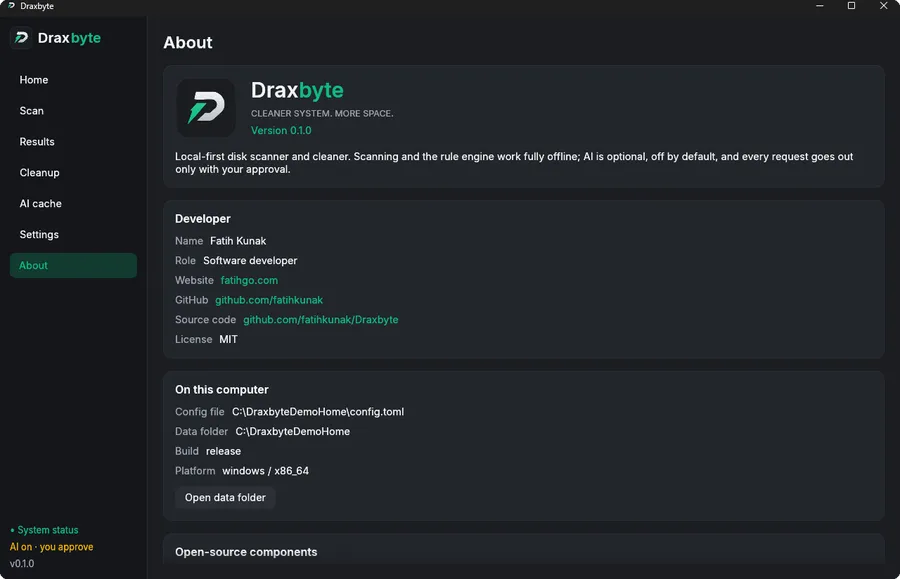
Draxbyte is developed by Fatih Kunak. For bug reports and suggestions, open an issue on GitHub.